✕
Ready to grow your bussiness?
Let's schedule a call to discuss your needs
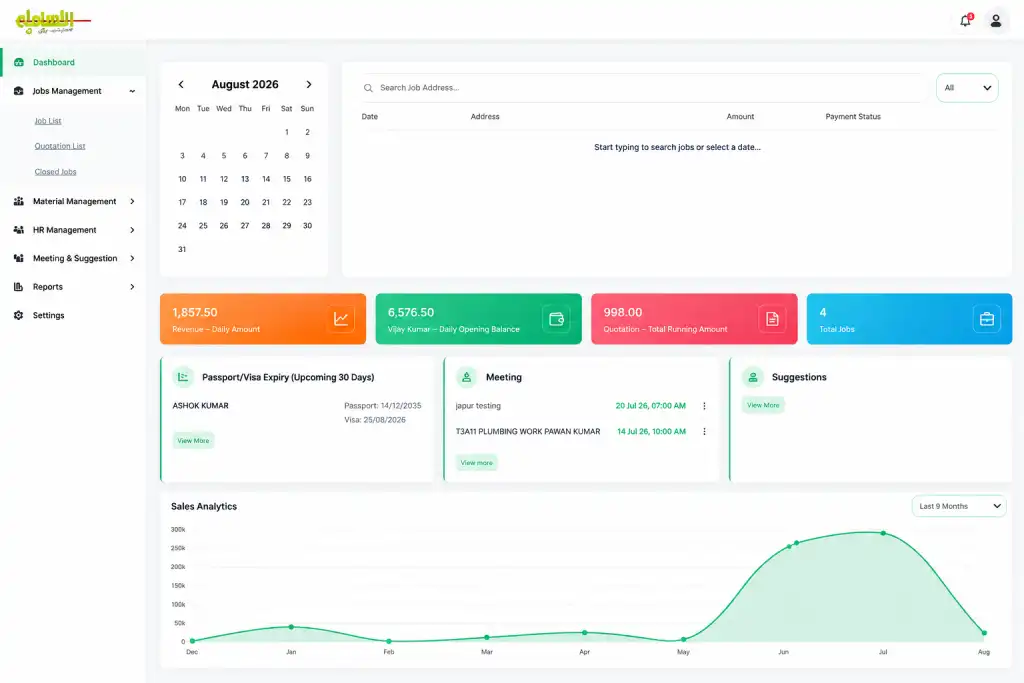
Take complete control of your business with one powerful platform built to simplify operations, improve team performance, and drive growth. Manage every process, monitor your business in real time, and keep your entire team connected — all from one easy-to-use dashboard.
Trusted by operations teams across industries
Our all-in-one job management system gives your admin team a clear, easy-to-use dashboard to manage daily operations, assign work, track employee progress, communicate instantly, manage materials, handle payments, and generate complete reports — all from one place. Everything runs through an automated workflow: admins create and assign the job, and the system handles notifications, reminders, status updates, tracking, and communication throughout the process.
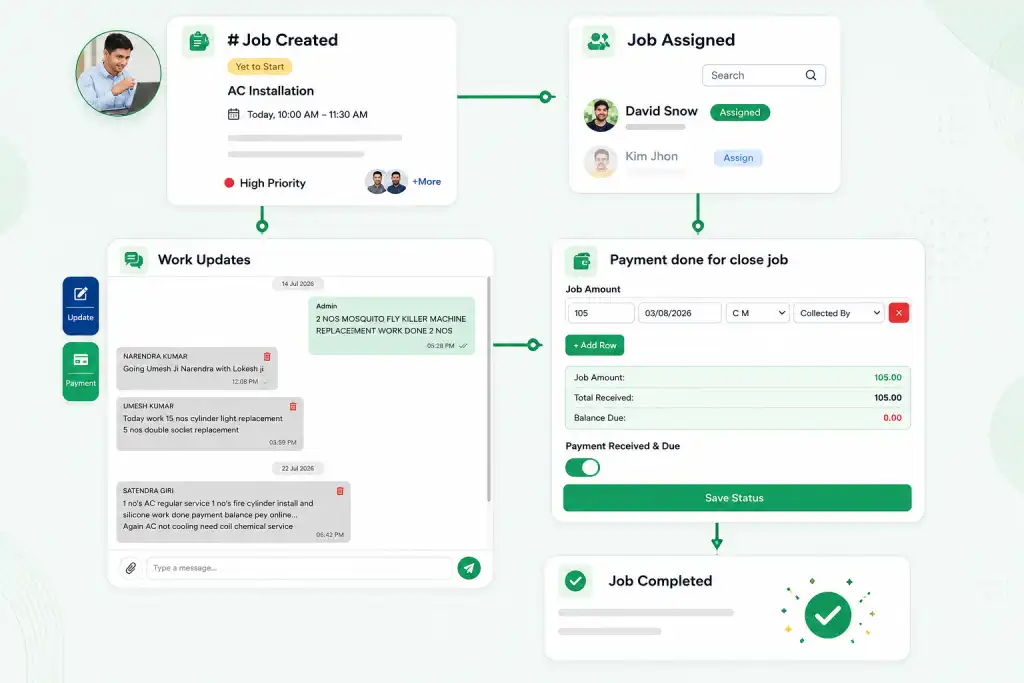
Creating and assigning a job takes only a few clicks. The admin adds employee, job location, date, time, job type, instructions, and supporting information, and assigns it to a specific employee so everyone knows exactly what to do and when. Once assigned, the employee automatically receives a notification with the complete job page — instructions, location, images, videos, PDFs and any other information provided by the admin. There is no need for the admin to repeatedly call or message the employee.
Jobs can be created for today, tomorrow, or any upcoming date, and the employee does not need to be notified manually every time — the system sends the relevant notification based on the scheduled date and time. For example, if a job is scheduled five days in advance, the employee receives the information beforehand and then automatic reminders as the job approaches — two hours before, one and a half hours before, one hour before, and thirty minutes before. This keeps employees informed without the admin having to remember every follow-up.
Once an employee receives a job, they review all the information and accept it directly from their account. When the employee accepts, the admin is automatically notified. The employee can then start working and update progress as work moves forward. When the work is completed, the employee marks the job as completed from their side — eliminating the need to call the office simply to say the work is finished. The admin then reviews the completed work, verifies details, manages payment, and closes the job from the dashboard.
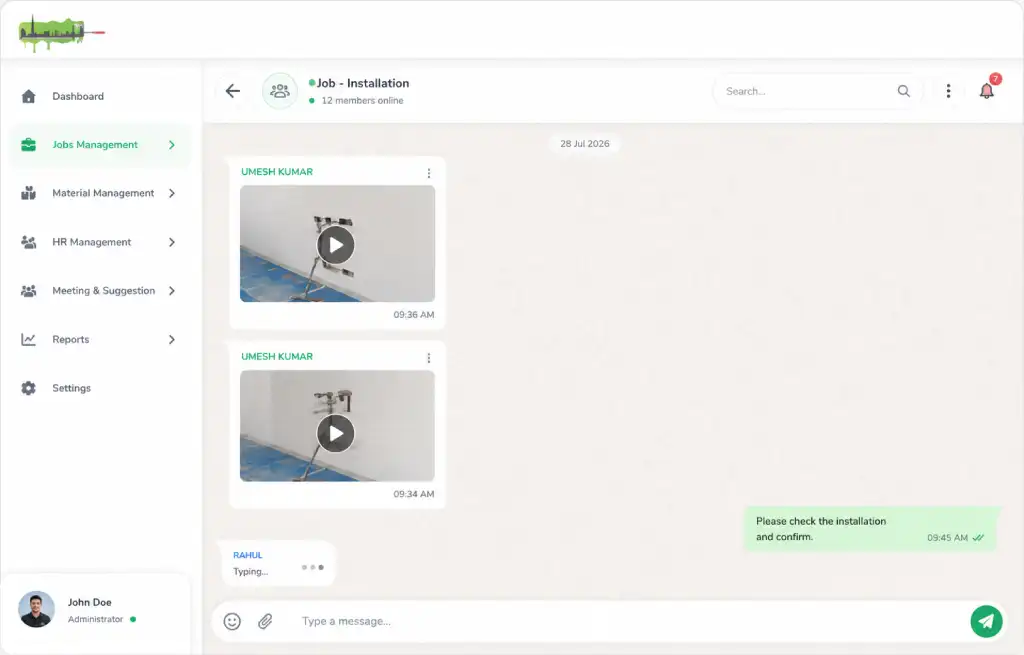
Employees can document the work directly from the job page: capture photos directly from their phone, record videos while working, upload photos and videos from their gallery, share before-and-after images, record voice messages, upload supporting files, and share updates directly inside the job conversation. This creates a complete visual record of the work. If something was damaged, required repair, failed during the process, or needs special attention, the employee can immediately capture a photo or video and share it with the admin — real-time proof that helps the office make decisions without unnecessary calls or delays.
Each job can have its own chat-style communication area, similar to WhatsApp. Employees and admins communicate directly within the job, sharing text messages, photos, videos, voice messages, documents, job updates, before-and-after proof, and important instructions. Employees can record a voice message directly from their phone or upload media from their gallery, and can capture a live photo or video while working. Whenever a new message or update is received, the relevant user gets a notification — keeping the complete conversation connected to the job instead of spreading it across phone calls, WhatsApp chats, and separate applications.
If an employee needs a particular material, tool, or company-provided item while working on a job, they can raise a request directly from the job. The responsible person is notified about the requirement and can arrange the item, reducing unnecessary travel and communication delays — employees don't have to repeatedly call the office to ask whether a required material is available or when it will be provided. The request and its status remain connected to the relevant job for future reference.
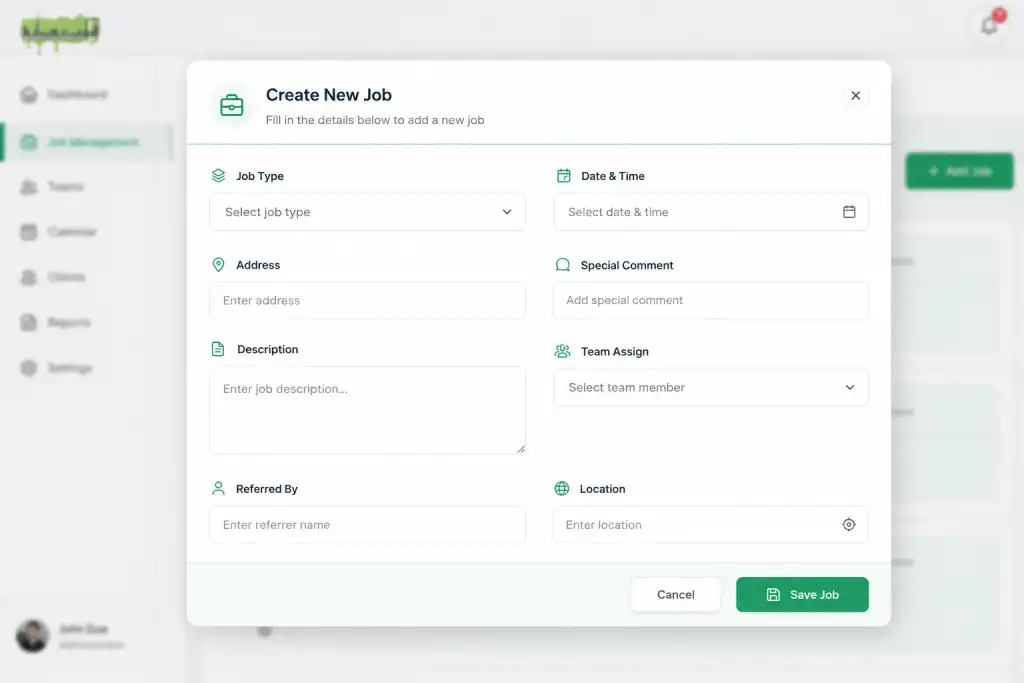
Not every job can be completed in a single visit. For long-term or ongoing work, the system provides a dedicated Quotation Job workflow. When creating a job, the admin can mark it as a quotation job and add the relevant quotation ID and agreed amount — the quotation becomes the central reference for the complete project. Whether the work continues for several days, weeks, or months, all activities remain connected to the same quotation.
The admin can assign a quotation job to an employee or team according to the project requirements, and monitor employee participation to see who is actively working and who has not yet started. If additional employees are required later, the admin can add or reassign them without creating an entirely separate project — any additional work, assignment, or related information stays connected to the same quotation.
The employee workflow remains simple even for quotation jobs: accept the assigned work, view project instructions, access quotation-related documents, upload photos and videos, send messages and voice updates, share progress, request materials, and mark their assigned work as completed. When an employee finishes their portion, they can close their assigned task — but the overall quotation remains under the admin's control, who reviews the complete project and officially closes the quotation when all work is finished.
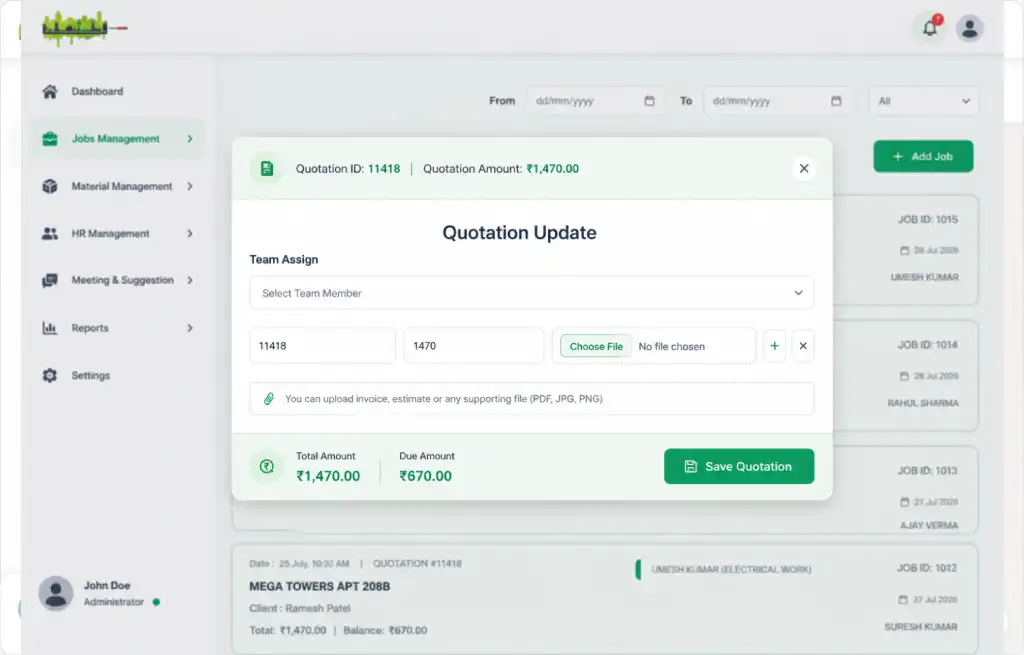
Quotation jobs can have predefined payment information controlled by the admin, so employees don't need to manage payment amounts themselves. The admin records total quotation amount, payments received, payment dates, amount paid, remaining balance, payment status, and payment source or method — and can update this information whenever a payment is received, providing a complete financial history of every long-term project.
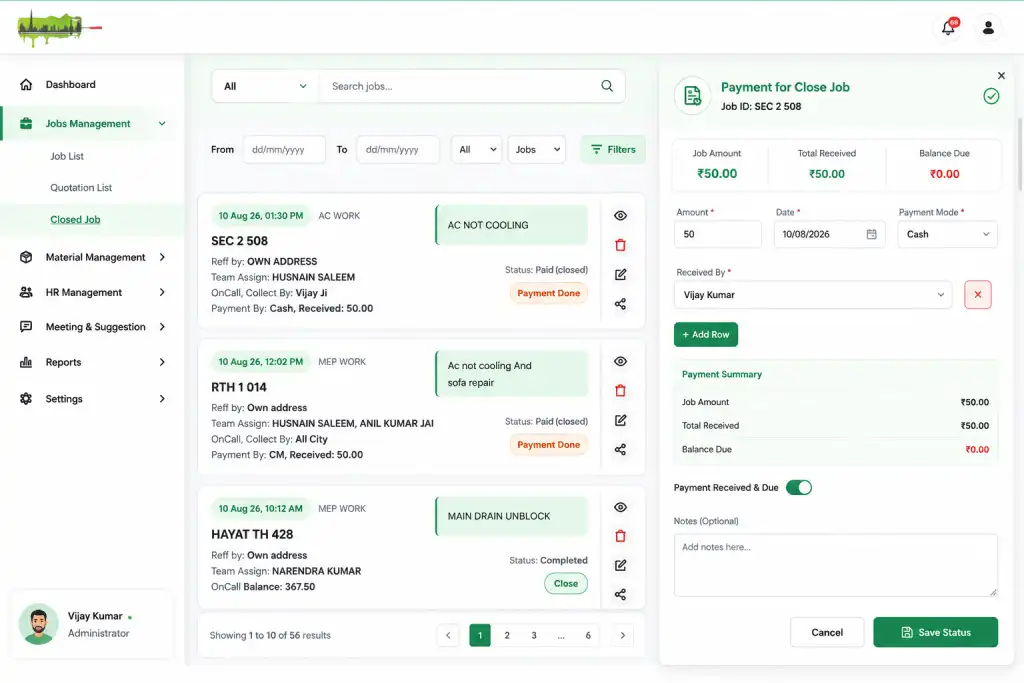
Once a regular job is completed, the admin can review and close it from the dashboard. The payment module records exactly what was received and what is still outstanding — total job amount, amount received, amount pending, payment date, payment method, payment history, remaining balance, and payment status. If a job is accidentally marked as completed by an employee, the admin can reopen it and continue the workflow; only authorized admins can finally close or reopen a job, giving the office complete control over the final job status.
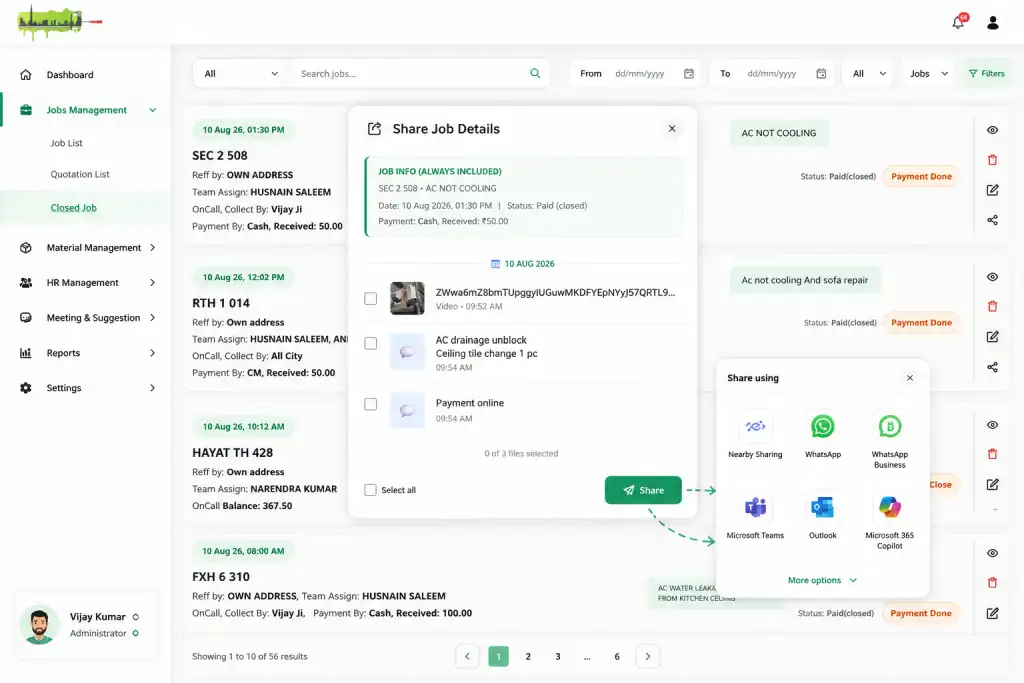
The system makes it easy to share job information with clients or employees through WhatsApp. Instead of manually copying information, the admin opens the sharing module and selects exactly what to share — job details, location, instructions, photos, videos, documents, payment information, important updates, or selected messages — making external communication faster while keeping the original job information safely organized inside the system.
Every job maintains its own complete history: when it was created, who it was assigned to, when the employee was notified, when they accepted it, when work started, job progress, messages exchanged, photos and videos uploaded, material requests, employee updates, completion status, payment records, closing date, and remaining balance — so important information never gets lost in separate conversations or paperwork.
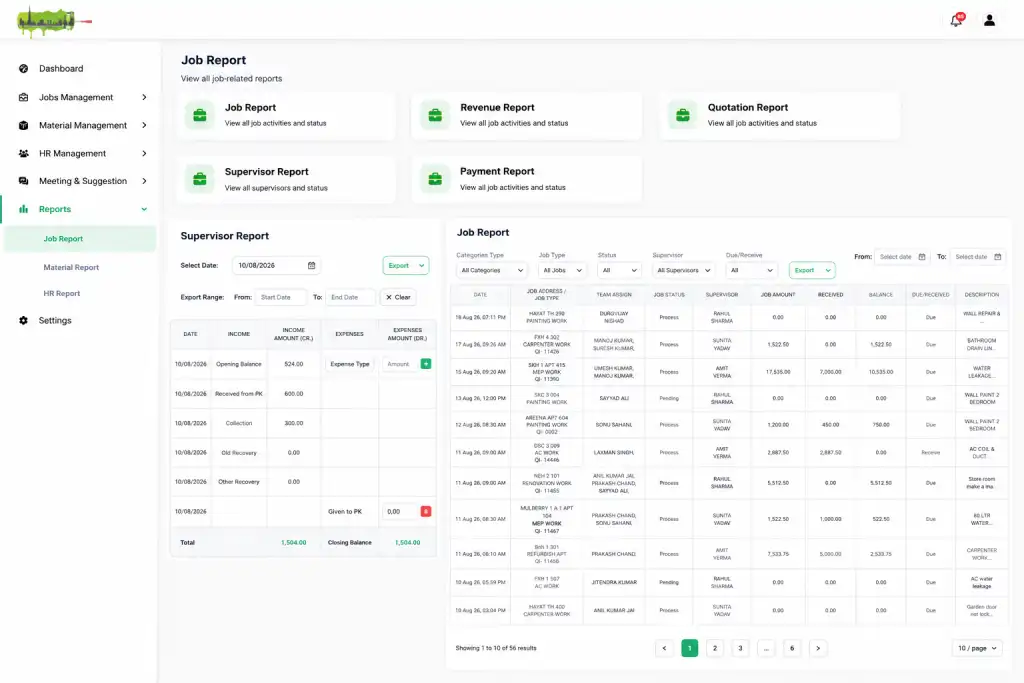
The reporting module gives the admin a complete overview of jobs, employees, revenue, quotations, and payments, with search and filter options for every requirement.
Filter jobs by employee, job category, job type, job status, accepted, pending, completed, or unaccepted jobs, date, or payment status. The report can show the current day's activity by default, so the admin quickly understands how many jobs are scheduled, in progress, pending, completed, or awaiting action — exportable or downloadable whenever required.
A clear overview of income generated through regular or on-call jobs — job-wise amount, revenue received, payment date and status, revenue by date, job type, or employee. Date filters allow daily, weekly, monthly, or specific-period review, exportable for accounting and business records.
A complete overview of long-term projects — quotations currently in progress, completed, pending, or unaccepted, quotation amount, amount received, remaining balance, and project status. The current date can be used as the default view so the admin immediately sees what needs attention.
A complete picture of money received and outstanding — total amount received, total pending, job-wise payments, employee-related payment information, payment dates and methods, opening balance, daily transactions, and closing balance. A daily payment summary helps the admin or supervisor understand exactly how much money was available at the start of the day, what was received, and the closing balance — filterable by date and exportable whenever required.
Manage your entire material and inventory operation from a single, centralized dashboard. Track available stock, new purchases, item requests, vehicle assignments, deliveries, returns, damaged items, expiry dates, and material demand without moving between multiple pages or systems. The dashboard provides a real-time view of what is available, what has been purchased, what has been issued, what is currently assigned to a vehicle or driver, what has been returned, and what needs attention. Everything is connected, so every stock movement automatically updates the relevant inventory records.
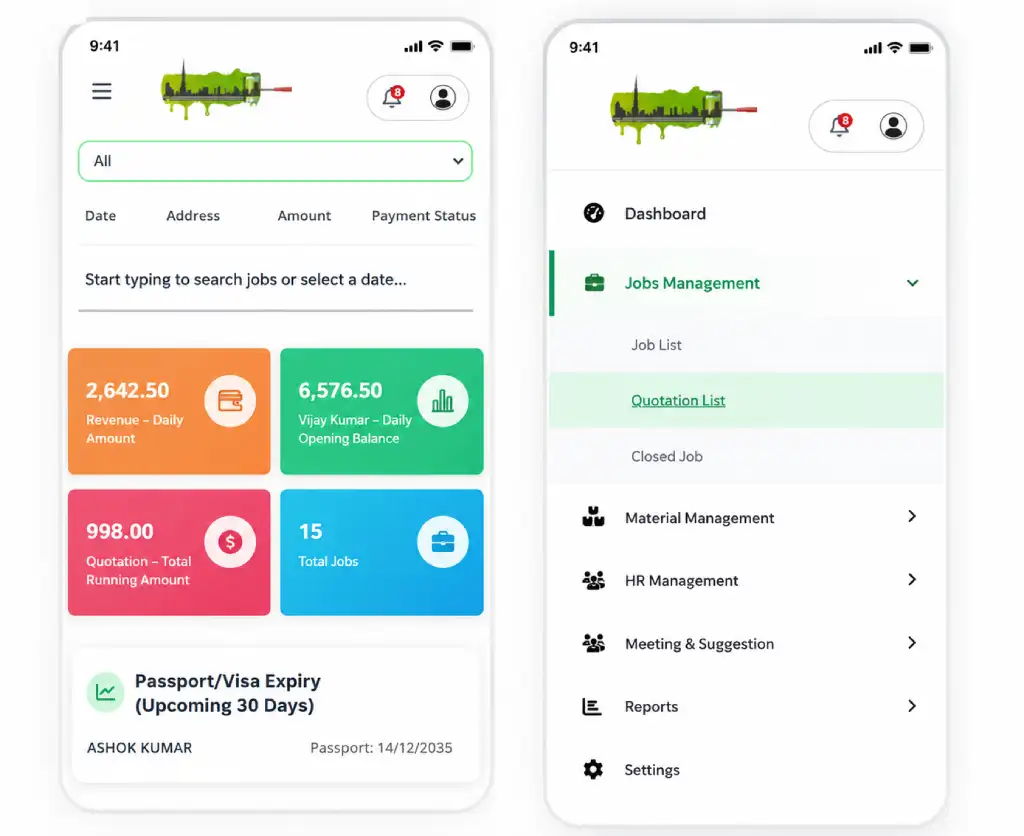
Always know exactly what is available in your inventory. Admins create and manage inventory items by defining their own categories through system settings, entering item name, category, unit, price, opening stock, current quantity, purchase information, item image, and other relevant details. The opening stock provides a starting point, while every future purchase, issue, return, or adjustment automatically affects the available quantity — instead of checking different records manually, the dashboard gives a real-time picture of the actual stock position.
The inventory dashboard brings together opening stock, newly purchased quantity, available quantity, requested quantity, issued quantity, delivered quantity, vehicle-assigned quantity, returned quantity, damaged or unusable quantity, remaining stock, and low-stock items — giving the admin an immediate understanding of where every item stands, searchable by item, category, date, vehicle, or other filters without opening separate modules.
When materials need to be delivered or assigned to field vehicles, the system lets the admin manage the complete process from the same inventory system.
Admins add vehicles and maintain vehicle name or number, type, assigned driver, vehicle documents, insurance details, expiry dates, registration-related information, and other vehicle-specific documents. PDFs and supporting files can be attached to the vehicle record, and the system tracks important expiry dates and provides alerts before a document expires.
A vehicle can have a specific driver assigned to it. The admin can search vehicles by name, number, or other information and quickly identify who is responsible. The system prevents conflicting assignments by ensuring a vehicle is assigned appropriately rather than simultaneously to multiple drivers where the workflow requires a single active driver.
The admin selects one or multiple inventory items and assigns specific quantities to a particular vehicle — for example, Vehicle A → Driver X: 20 units of Item A, 10 units of Item B, 5 units of Item C. The assigned quantity is automatically recorded against that vehicle, and the admin can later open the vehicle record to see exactly which items were assigned, how much was assigned, how much is still assigned, how much was used, how much was returned, and how much remains unassigned — complete visibility into materials currently held by each vehicle. Vehicle-related inventory can be searched and filtered by vehicle name/number, driver, item, category, date, or assignment status.
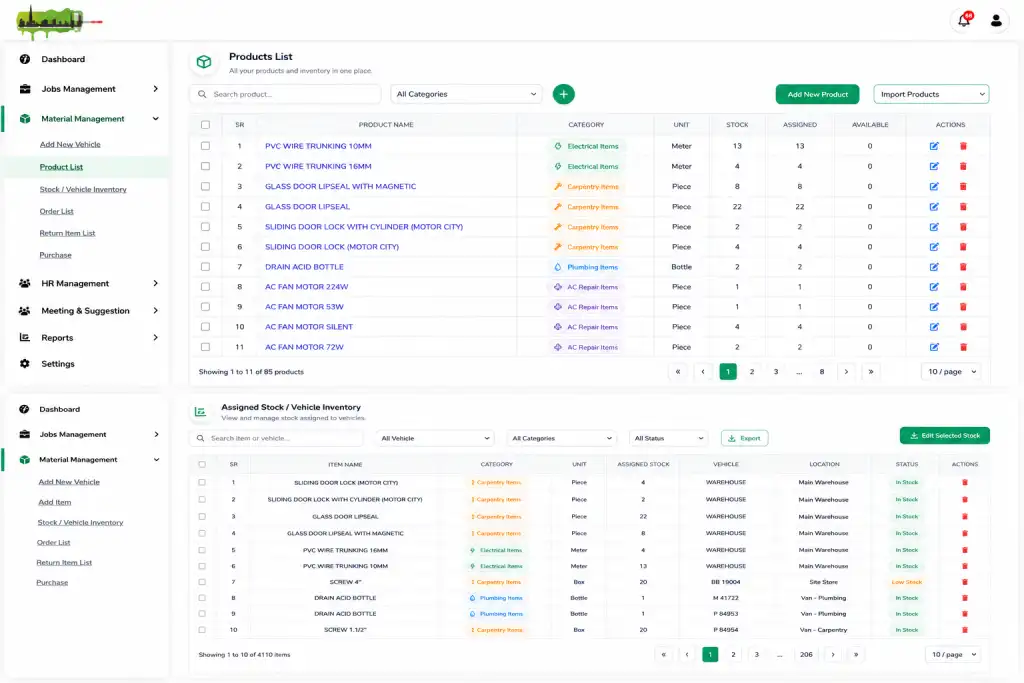
For businesses with large inventories, manually entering every item can be time-consuming. The system supports bulk item import through a predefined template: download the sample import format, fill in the required inventory information, upload the completed file, and the system automatically creates the inventory records — much faster than migrating or updating large amounts of stock data manually. Admins can also edit or delete inventory records when required, with appropriate administrative access.
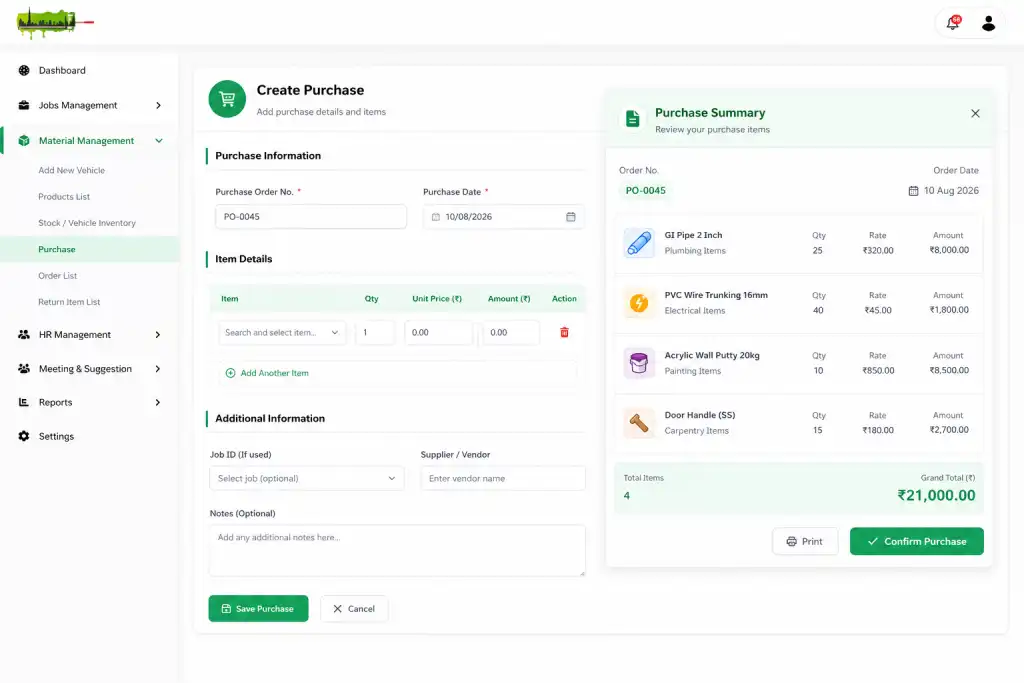
Whenever new materials are purchased, the admin records the purchase directly in the system — purchase ID, purchase date, supplier/vendor, item, category, quantity, purchase price, total amount, supporting documents, and other purchase details. Once added, the purchased quantity is automatically added to the actual inventory — for example, if the current stock is 50 units and the business purchases another 100, the available inventory automatically updates to 150, with no need to manually update stock again. Purchases can also be edited or deleted by authorized admins when corrections are required.
Material does not always remain with the employee or vehicle permanently. When materials are returned, the return entry records item name, returned quantity, vehicle, driver, return date, return reason, condition, return images, and additional notes — employees or drivers can provide photos to show the condition of returned material, especially useful when an item is damaged, partially used, faulty, or returned for another reason. The return quantity is reflected in inventory so the admin maintains an accurate stock position, with a complete return history showing what was returned, how much, by whom, from which vehicle, when, why, supporting images, and current return status — making it easier to identify missing, damaged, or frequently returned materials.
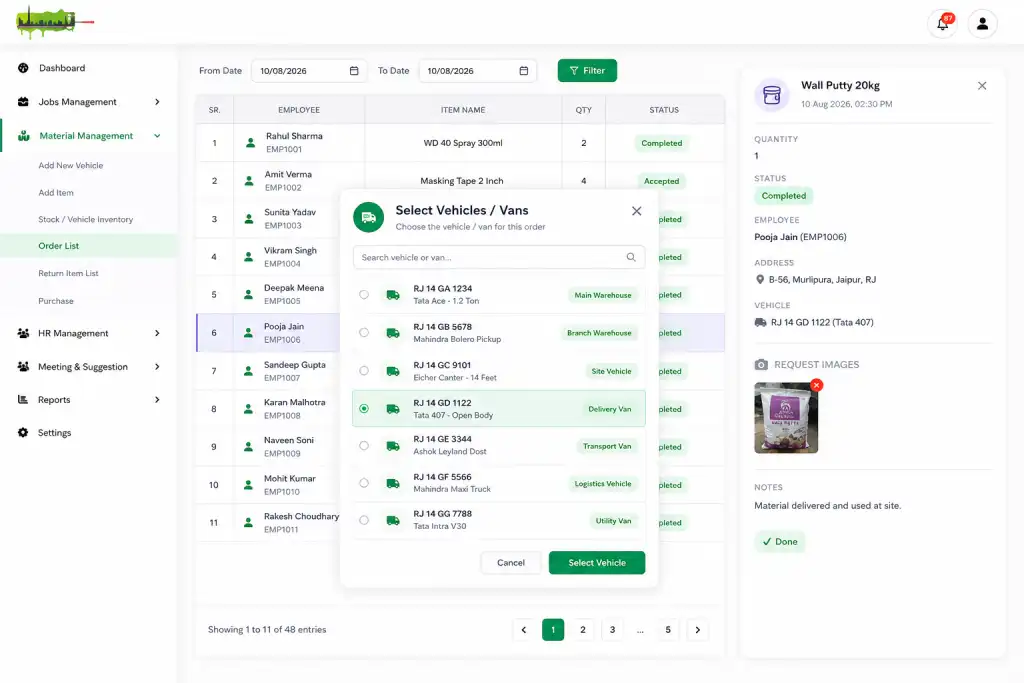
Employees or field teams can request materials when they need them for a job. The request is reviewed by the responsible admin, who can approve, issue, or arrange delivery of the required items. The system tracks the request from beginning to completion — Requested → Approved → Issued → Delivered → Used/Assigned → Returned — so the admin sees status without relying on calls or separate messages. If a requested item is unavailable, the system makes clear that additional stock or purchasing may be required.
The system helps identify what materials are being used most frequently — admins analyze items by number of requests, quantity requested, issued, purchased, delivered, returned, vehicle usage, date range, and category, helping identify high-demand materials and plan future purchases accordingly, reducing stock shortages and improving purchasing decisions.
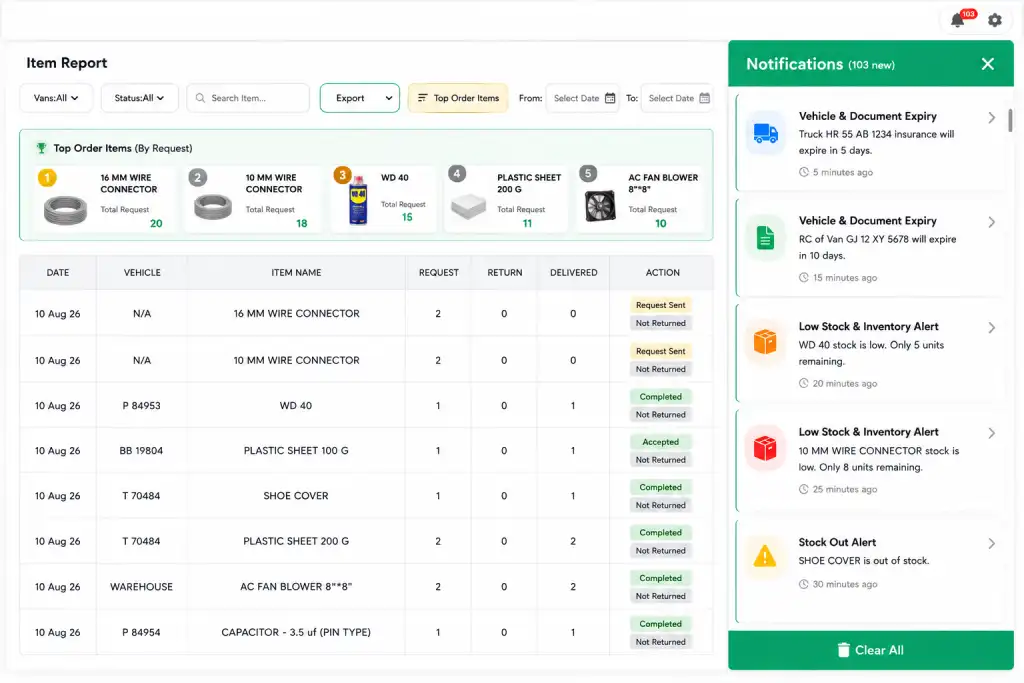
The system automatically identifies items reaching their minimum stock level and notifies the responsible admin, allowing action before the item runs out completely. Notifications also cover new purchases added, material requests received or approved, items issued or delivered, material returned, vehicle and driver-related updates, document expiry, and other important inventory changes — reducing the need for admins to continuously check every section manually.
Vehicle-related documents like insurance and registration are stored directly against the vehicle record, with the system tracking expiry dates and giving advance notifications before expiry and alerts once a document has already expired — helping prevent important vehicle documentation from being overlooked.
The reporting section gives a complete overview of inventory activity from one place, searchable, filterable, exportable, and downloadable.
Item name, category, opening stock, purchased, requested, issued, delivered, returned, and available quantity, with current stock status — searchable by item, filterable by category or date, exportable as PDF.
Complete purchasing history — purchase ID, supplier/vendor, purchase date, item name, quantity, purchase price, total amount, category, and supporting information — filterable by date, supplier, item, or category.
A complete history of how materials move through the business — items purchased, requested, issued, delivered, assigned to vehicles, returned, and current item status — filterable by item, category, vehicle, status, or date, giving a clear picture of the complete journey of an item from purchase to final use or return.
Sometimes an employee requests an item not currently available in inventory. The system maintains a separate record — which new item was requested, who requested it, when, required quantity, current request status, and whether it has been purchased or added to inventory — helping the business identify new materials that need to be added to regular stock.
The system maintains expiry-related information for relevant vehicle documents and other records — already expired records, records expiring soon, upcoming expiry dates, associated vehicle, document type, and expiry date — filterable, with notifications before important dates, making it easier to act before an expiry creates an operational problem.
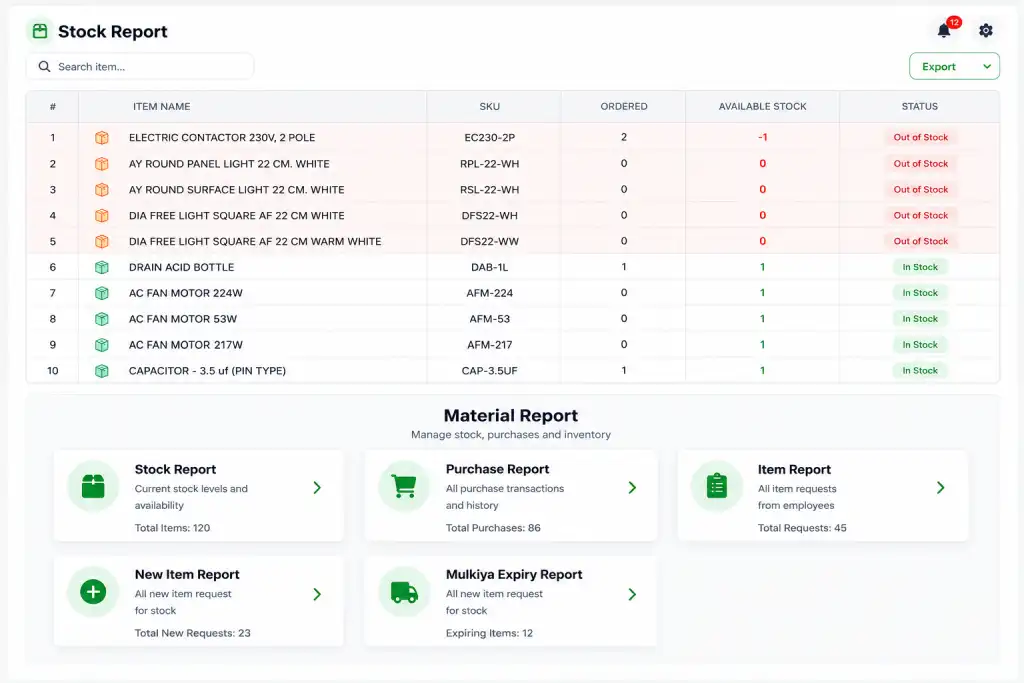
Manage your entire employee lifecycle — attendance, leave, salary, deductions, advances, overtime, complaints, documents, and payroll — from one centralized HR dashboard. The system is designed to reduce manual HR work and eliminate the need for separate spreadsheets and registers. Employee attendance automatically connects with leave, deductions, overtime, advances, and monthly payroll so the admin always has a clear view of each employee's records — attendance history, salary information, documents, leave records, complaints, deductions, and payment history, all managed from one place, with salary and the salary card calculated as payroll each month.
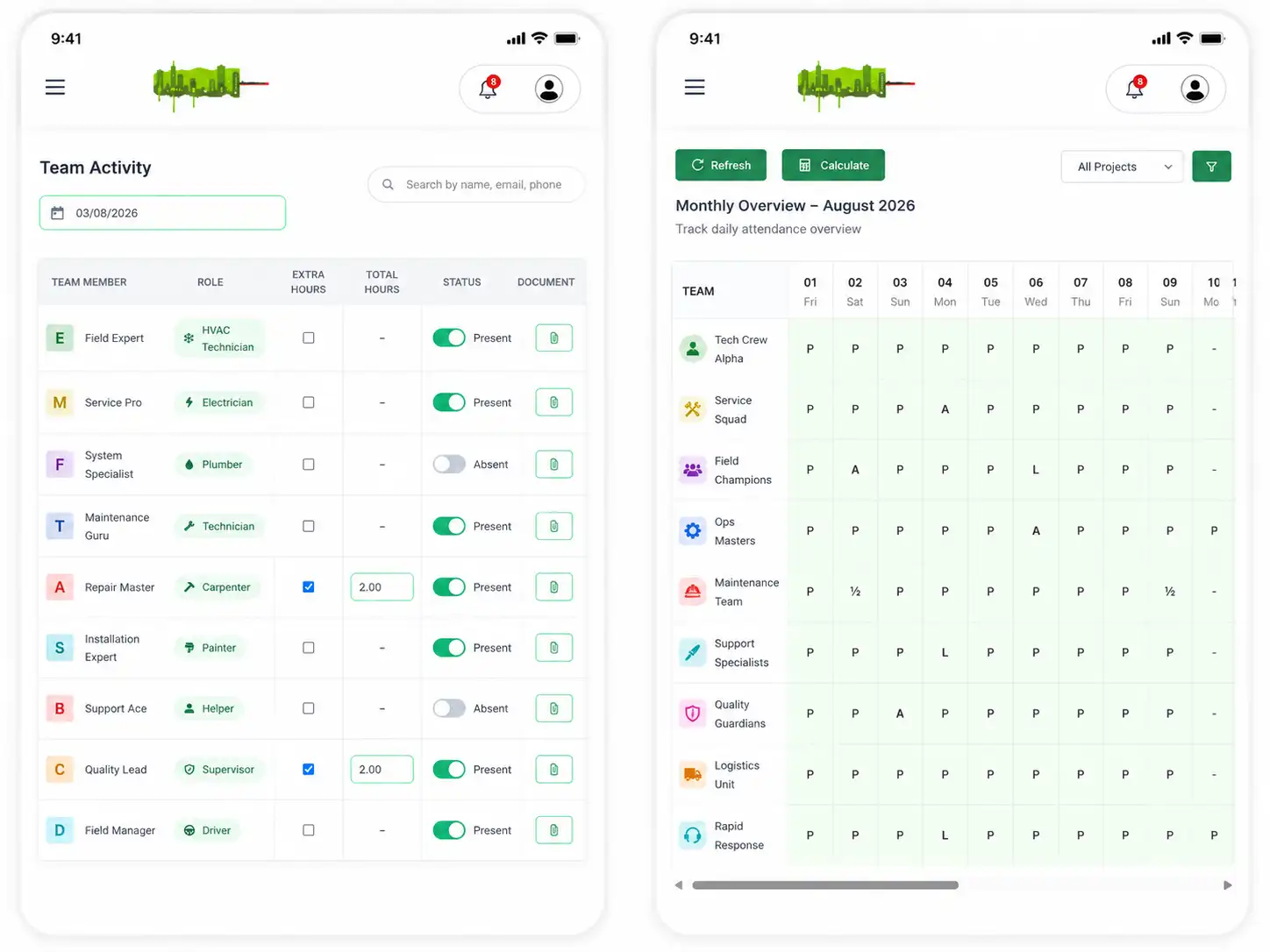
Track employee attendance every day and clearly see who was present, absent, on leave, or unavailable. The attendance system records present and absent employees, leave status, holiday status, half-day attendance, late arrival, early departure, working hours, overtime, attendance notes, and reason for absence. Admins define attendance rules and available options according to business requirements, and attendance can be recorded manually or through the available workflow. If an employee is absent, the admin can record the reason — approved leave, sick leave, holiday, or another applicable reason — with supporting documents attached where required, such as a medical document for sick leave.
The system automatically calculates attendance information based on recorded entries. Admins select the required attendance status and enter the relevant time or working information, and the system uses this data for monthly attendance and payroll calculations — HR does not need to manually calculate every employee's attendance at month end.
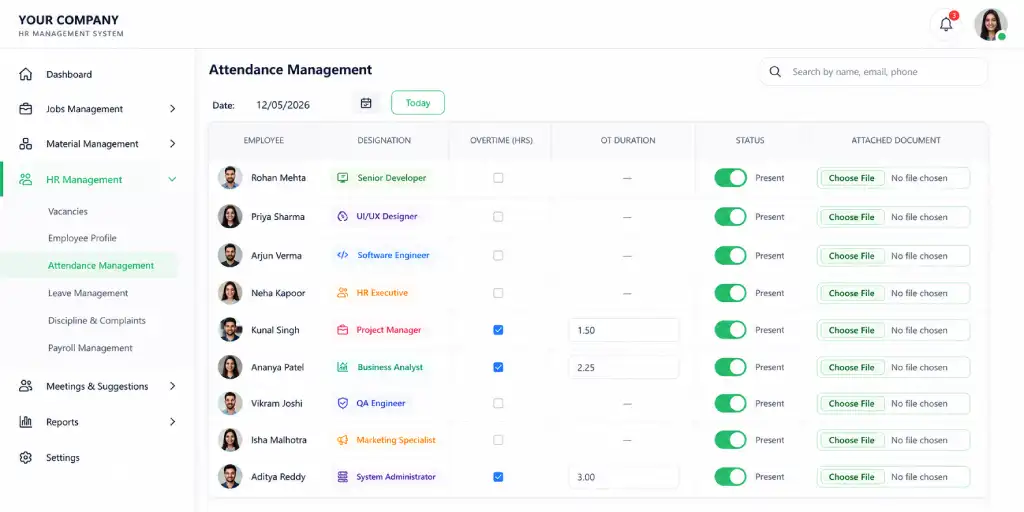
Employees submit leave requests through the system, while admins review and approve or reject them. Once approved, the attendance record is automatically updated. The system maintains leave type, leave date, start and end date, number of leave days, leave reason, supporting documents, approval status, approved by, and approval date. Approved leave automatically flows into the employee's attendance and payroll calculations according to configured rules, and the admin can also manage leave records manually when required.
Notifications are generated when an employee submits a leave request, when a request is approved or rejected, when leave dates are approaching, or when attendance requires attention — keeping both employees and administrators informed without requiring manual follow-up.
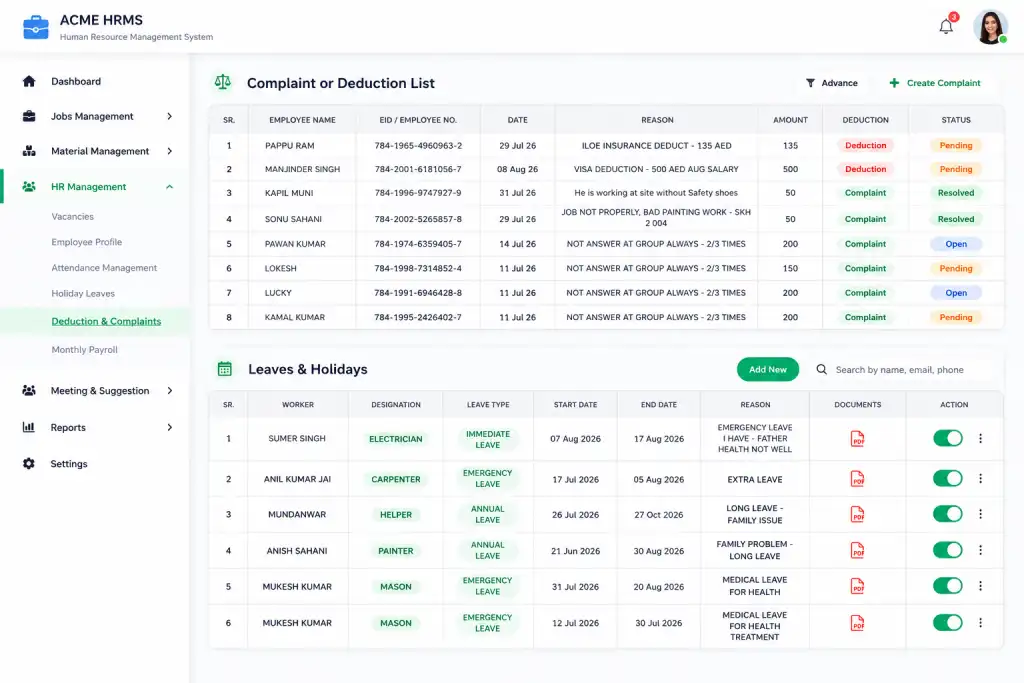
The system provides a dedicated area for managing employee deductions and salary advances. Admins define deduction types and record the reason, amount, date, and related employee — deductions can relate to absence, late attendance, approved company deductions, complaints or penalties, salary advances, or other configured types. Each deduction remains connected to the employee's payroll record.
If an employee receives a salary advance, the admin records it separately, identifying whether the amount should be added as an advance/payment, recovered from future salary, deducted from current payroll, or recorded as outstanding. The advance list provides a clear history of how much was given, when, and how much remains to be recovered — automatically contributing to the employee's salary calculation where applicable.
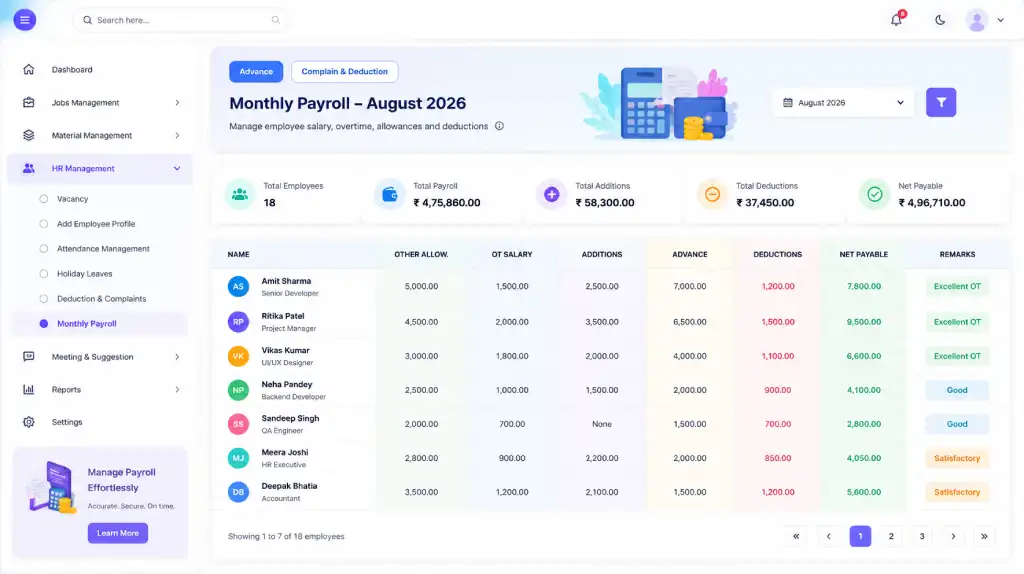
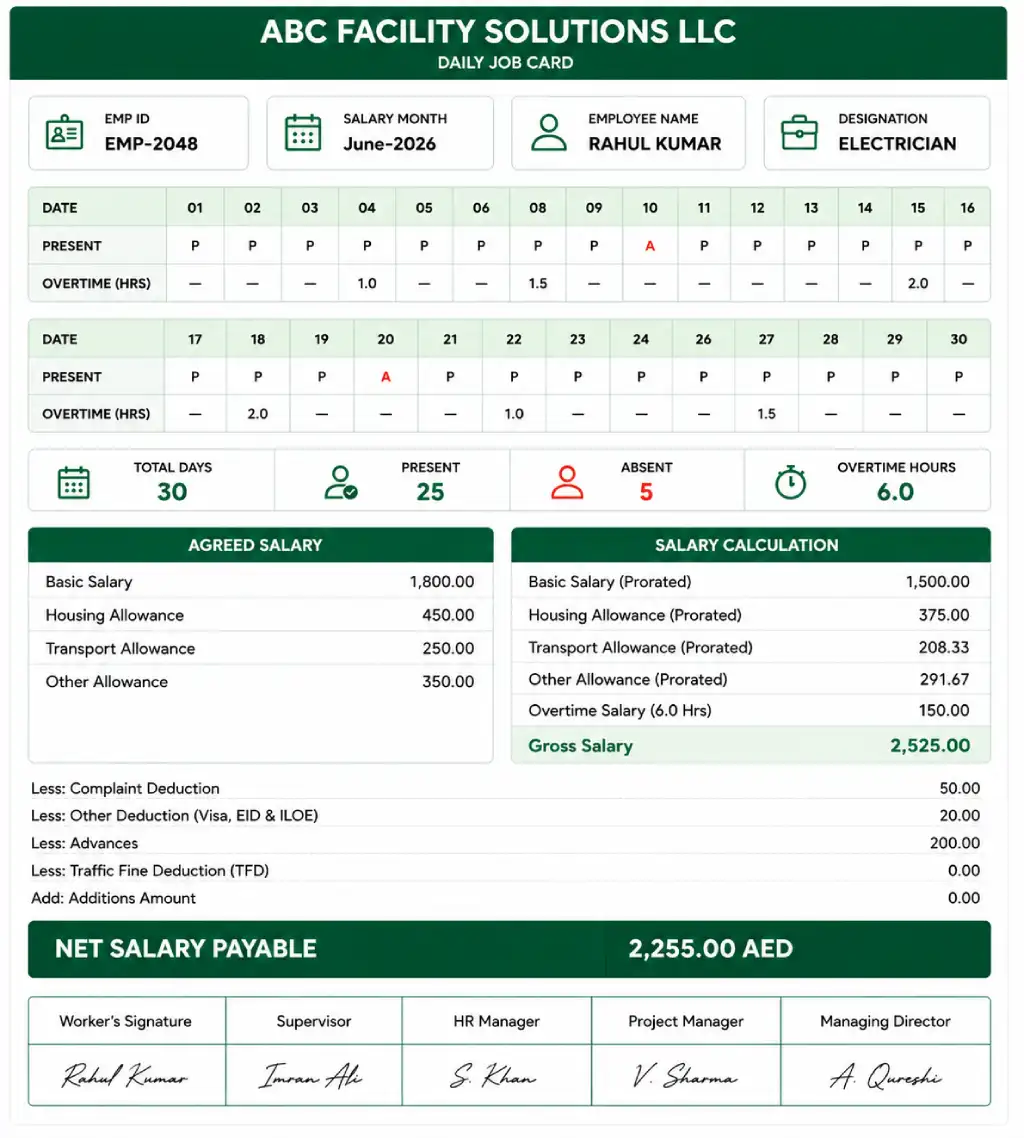
Every employee can have an individual salary card containing complete payroll information — employee salary, present days, absent days, leave days, holidays, half days, overtime and overtime amount, advances, deductions, other allowances, gross salary, net payable salary, payment history, and salary status. Admins can view the salary card for a specific employee or filter by day, month, or previous payroll period, and employees can access their own relevant salary information according to admin-configured permissions.
At the end of each payroll period, the system brings the employee's relevant records together automatically: Base Salary + Allowances + Overtime − Leave/Attendance Deductions − Advances − Other Deductions = Net Payable Salary. The exact calculation follows the rules configured by the admin, taking attendance, approved leave, holidays, overtime, advances, and deductions into account — giving HR a clear, consistent payroll calculation for every employee, instead of manually calculating salary using spreadsheets.
A monthly summary is automatically generated for each employee, showing total working days, present days, absent days, leave days, holiday days, half days, total overtime hours and amount, total deductions, advance amount, gross salary, net payable salary, payment status, and salary payment history — generated from records already in the system, so there is no need to manually prepare an individual monthly summary, making the payroll process faster, clearer, and easier to audit.
The HR system maintains employee complaint records — complaint type, complaint details, related employee, complaint date, related deduction, deduction amount, approval status, admin remarks, and supporting documents. The admin approves or rejects the complaint-related action and maintains a complete history of the decision, with reports filterable by employee, date, complaint type, status, or deduction — ensuring every complaint or related deduction has a documented record.
Employee contract information is maintained directly in the employee profile — contract salary, monthly salary, allowances, contract period, salary changes, effective date, and other configured employment terms. Admins can compare the defined salary with the actual payroll generated for the employee, helping identify how much salary was originally defined, what was earned during the month, what deductions or allowances were applied, and what the final payable amount became.
The system maintains company holidays and holiday-related attendance information. Admins define applicable holiday dates and types, and employee attendance records clearly show whether a day was a working day, holiday, weekly off, leave, absent, or present — with the monthly summary showing the complete holiday and attendance breakdown.
The employee profile stores important documents and their expiry dates — visa, passport, work permit, identification documents, contracts, licenses, and other employee-related documents, along with expiry date and status. Admins can search or filter employee documents by employee, document type, expiry date, or status.
The system automatically notifies the admin when an employee document is approaching its expiry date, and generates notifications for documents that have already expired — helping HR take action before an important employee document becomes invalid.
The notification system keeps HR informed about important employee-related events — new leave requests, leave approval or rejection, attendance issues, late attendance, absence, overtime updates, salary advances, new deductions, complaints submitted or decided, payroll generated, salary payment updates, and employee documents approaching or past expiry. Instead of checking every module manually, admins receive relevant alerts and can immediately open the related record.
The employee report covers employee details, joining information, contact information, employment status, address, contract information, salary details, document status, visa/passport information, and expiry dates. The attendance report covers present, absent, leave, holiday, and half days, late arrivals, working hours, overtime hours and amount — both filterable by employee, date, or status, and exportable as PDF.
The leave report covers employee name, leave type, dates, number of days, reason, approval status, and approval/rejection date. The salary and payroll report covers defined salary, working and present days, leave and absence deductions, overtime, allowances, advances, other deductions, gross salary, net payable salary, amount paid, payment date, remaining amount, and payment status — filterable by employee, month, date, or payment status, and exportable as PDF.
The complaint report tracks complaint type, employee, date, status, related deduction and amount, and admin decision. The contract report compares contract salary, monthly salary, allowances, salary revisions, effective dates, and current payroll amount against actual payable salary. The document expiry report highlights already-expired and soon-to-expire employee documents by employee, type, and expiry date — all filterable and exportable.

Give each team only what it needs. HR opens just the HR module, ops sees Jobs and Material — or run all three from one unified dashboard.
Create, assign, and close jobs — with proof of work and payment on record.
Stock, purchases and issued items, always up to date.
Attendance, leaves and payroll, handled every month.
Jobs, Material and HR can be opened separately by different teams, or used together as one system.
No need for a separate WhatsApp group — updates happen inside the job or task record.
A lightweight companion app your field team already knows how to use.
Partial settlements, multiple payment modes and full reporting, out of the box.
Connect JoHDash with the systems you already use — eliminate silos and keep every team in sync.
Flexible APIs let JoHDash sync data automatically with your existing CRM, ERP, accounting or communication tools — keeping technicians, back-office teams, and customers connected in real time.
Real-time job updates, attendance, and inventory — right from your technician's phone, even offline.
"JoHDash brought our job tracking, inventory and payroll into one place. Our field team stopped calling the office for every small update."
"Switching between spreadsheets for attendance and stock was slowing us down. Now everything is on one dashboard and payroll runs itself every month."
"The Android app is simple enough that our technicians picked it up in a day. Photo proof against every job has cut disputes to almost zero."
₹500/month per module — take all 3 together for ₹1,000/month.
Book a 20-minute walkthrough — no commitment needed.
Book a DemoGet the right guidance with a dedicated strategist by your side — every step of the way.