×

Schedule a Call

Ready to grow your bussiness?

Let's schedule a call to discuss your needs

● Built for Sales, Service & Finance Teams

One Dashboard to Take a Lead From First Call to Invoice & Payment

A lead comes in, you make the call — the moment they show interest, a company profile is created for them automatically. From there, the Performa Invoice auto-fills, the invoice is generated, expiry reminders go out on their own, and the service team gets assigned — all from one dashboard.
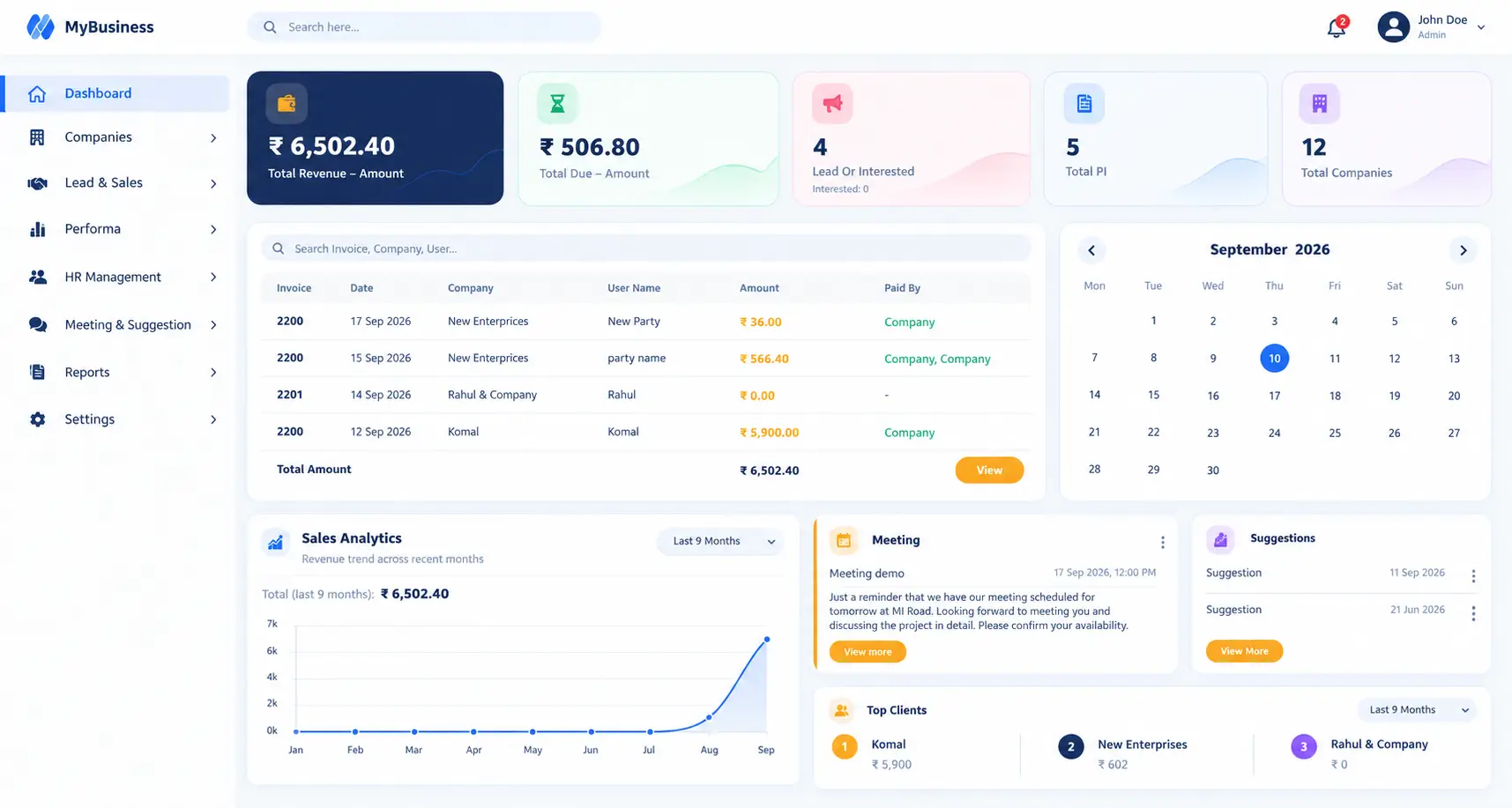
Novel Invoice dashboard showing leads, PI and payments

Trusted by teams across industries

FieldPro Services Ace Elevators Coolwave HVAC Guardian Pest Control
Leads

Every lead call turns into a company — automatically

From First Call to a Ready Company Profile

Log every lead and every call made to them. The moment a lead shows interest, its company profile is created on its own — no separate step, no re-entering details later when the first invoice needs them.
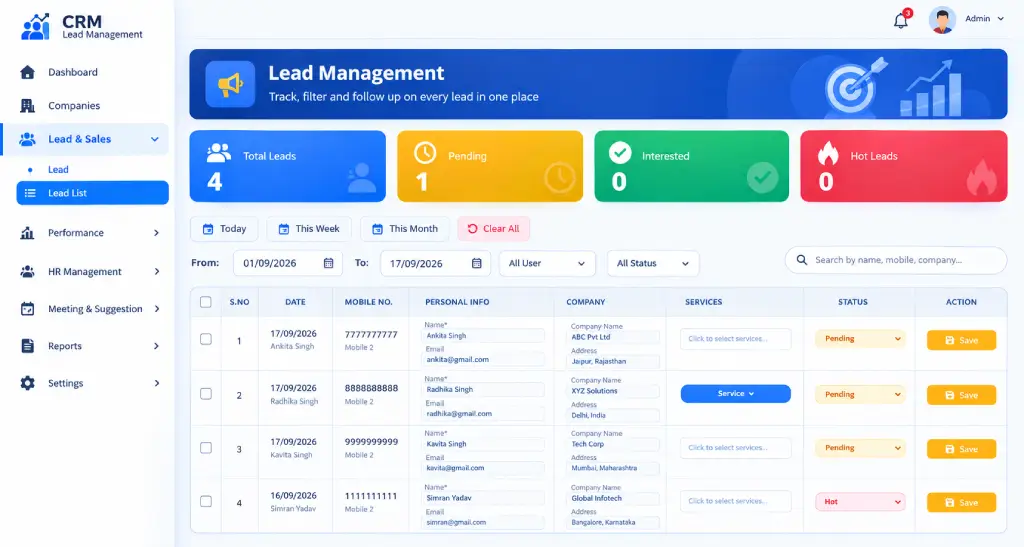
  • Lead & call logging: every lead and its calls tracked in one place.
  • Auto company creation: the moment a lead turns interested.
  • One record, reused everywhere: the same company feeds every PI and invoice after.
  • Nothing falls through: leads still being worked stay visible until they convert.
Interested lead converting into a company
See the complete Leads workflow — call to company

Every Call, Logged Against the Lead

Add a lead the moment it comes in and log every call made to them, so nothing about that conversation is lost by the time they're ready to move forward.

Nothing Waits on Memory

Every call — interested, undecided, or not ready yet — stays attached to the lead, so the next follow-up picks up exactly where the last one left off.

Interested Lead Becomes a Company

When a lead confirms interest on a call, its company profile is created right away, carrying over the details already captured — nothing typed twice.

Ready Before the First PI

Since the company is created at the point of interest, it's already in place by the time anyone needs to raise a Performa Invoice for them.

One Company Record, Ready for PI

Once a company exists, it's ready to be picked up the moment a PI needs it — no separate "add company" step down the line, and no digging through old lead notes.

Traceable Back to the First Call

Every company still carries the lead and call history that created it, so the full story is there if anyone needs to look back.


Company & PI

Search a company once, and the PI fills itself

GSTIN, Address & Rate Auto-Fill on Every PI

Start typing a company name while raising a PI — if it already exists, every saved detail fills in on its own. If it doesn't, a new company is created right there, and the PI is generated automatically once it's confirmed.
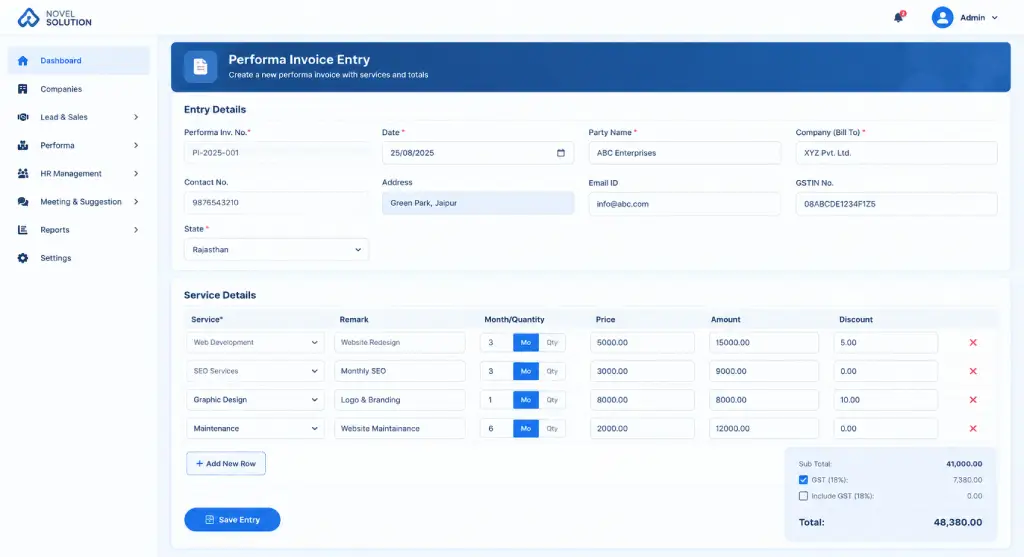
  • Search-as-you-type: a matching company auto-fills the PI instantly.
  • New company on the spot: created inline if there's no match, without leaving the screen.
  • Rate and terms carried over: from the company's saved profile.
  • PI auto-generated: the moment the company is set.
Company search auto-filling a Performa Invoice
See the complete Company & PI workflow — search to auto-PI

Type a Name, Get the Full Record

Typing a company name on the PI screen checks it against saved companies. A match fills GSTIN, address, contact and rate automatically, so the PI is almost ready before you've typed anything else.

No Match? A New Company Is Created — and the PI Follows

If the company isn't found, it's added as a new record right from the PI screen. Once it's confirmed, the Performa Invoice for it is generated automatically — no separate step to build it from scratch.


Assignment & Reports

Invoice, reminder mail and service team — all triggered on assignment

From Assigned PI to Employee & Manager Reports

Once a PI is assigned, the invoice is generated automatically, and a reminder email goes out before it expires. The service company and its team get assigned to the job at the same time, with reports split separately for employees and managers.
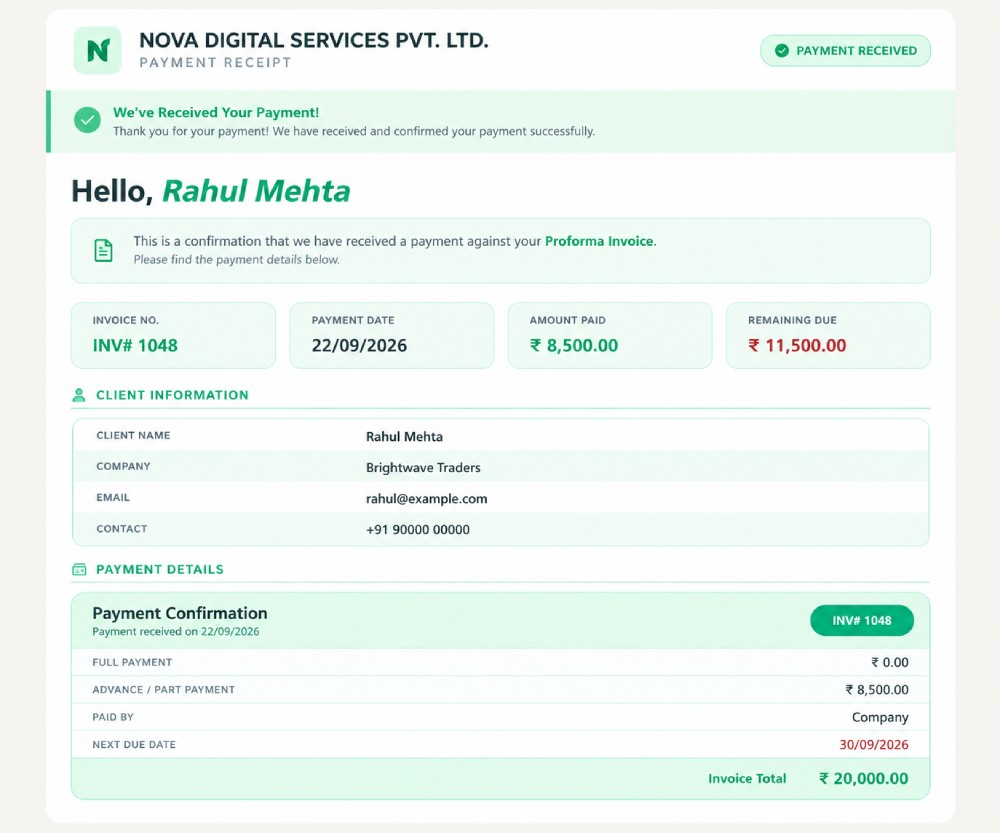
  • Auto invoice on assignment: created the moment a PI is confirmed.
  • Expiry reminder mail: sent automatically before the invoice runs out.
  • Service company & team assignment: created and linked in the same step.
  • Separate reports: daily reports for employees, a different rolled-up view for managers.
  • Suggestion settings: control what auto-fills and what needs confirmation.
Auto invoice, expiry reminder and service team assignment
See the complete Assignment workflow — invoice to reports

Invoice Created the Moment It's Assigned

As soon as a PI is assigned, its invoice is generated automatically, and a reminder mail goes out to the client before the invoice expires — no manual follow-up needed to catch it in time.

Service Company & Team, Assigned Together

Assigning the job also assigns the service company and its team — creating that team record if it doesn't already exist — so the right people are linked from day one. Employees see their own daily reports, while managers get a separate, rolled-up view, and suggestion settings let you control what auto-fills versus what needs manual confirmation.

How It Works

Leads, Company & PI, and Service & Reports — access each on its own, or all together

Give each team only what it needs. Sales logs leads and calls, accounts opens Company & PI, service teams see their assignments — or run all three from one unified dashboard.

📞

Leads & Companies

Log every lead call, and let interested leads turn into ready company profiles automatically.

  • Lead & call logging
  • Auto company creation on interest
  • One record reused on every PI
  • Nothing falls through the cracks
📄

PI & Invoicing

Search a company and watch its GSTIN, address and rate fill the PI — or create a new company on the spot.

  • Search-as-you-type auto-fill
  • New company creation inline
  • PI generated automatically
  • Invoice auto-created on assignment
👥

Service & Reports

Expiry reminder mails, service team assignment, and reports split for employees and managers.

  • Auto expiry reminder mail
  • Service company & team assignment
  • Employee daily reports
  • Separate manager-level reports
100%Leads tracked through to invoice
1Modules — use one or all
24 hrSetup for your team
1Dashboard, no more spreadsheets
Why Teams Switch

Built for how sales, accounts and service teams actually work

🔗

Every step connected

Lead, company, PI, invoice and service team stay linked, so nothing needs re-entry between stages.

🔔

Built-in reminders

Expiry reminder mails go out on their own, before an invoice runs out — no separate tracker needed.

📱

Mobile-ready

A lightweight app your sales and service team can pick up in a day, even offline.

⚙️

Suggestion settings

Choose what auto-fills and what needs confirmation, right from account settings.

Customer Stories

What teams say after switching

"A lead used to sit in a call log while accounts waited to hear about it. Now the moment someone's interested, the company and PI are already there."

Ramesh SharmaOperations Head

"We stopped retyping GSTIN and address on every PI. Search the company once, and it's all filled in — new companies get added just as fast."

Priya NairAccounts Manager

"Once a job is assigned, the invoice, the reminder mail and the service team all happen on their own. My team just checks their daily report."

Arjun MehtaFounder
Pricing

Start free, upgrade when you need to

No hidden fees — move to the paid plan whenever your business is ready.

Free

₹0/month
  • Basic lead & PI tracking
  • Up to 50 invoices/month
  • 1 admin user
  • Email support
Get Started Free
FAQ

Frequently asked questions

What is Novel Invoice?
Novel Invoice takes a lead from the first call through company creation, Performa Invoicing, auto invoicing, expiry reminders and service team assignment — all from one dashboard, so your office works from a single source of truth instead of scattered spreadsheets.
Does a lead really turn into a company on its own?
Yes. Once a lead confirms interest on a logged call, a company profile is created automatically, ready to be used the next time a PI is raised for them.
What happens if I search a company that doesn't exist yet?
It's created right there as a new company record, so the PI can still be built without leaving the screen — and it auto-fills the next time.
Is the invoice created automatically after assignment?
Yes — once a PI is assigned, the invoice is generated automatically, and a reminder mail goes out to the client before it expires.
Are employee and manager reports different?
Yes — employees see their own daily reports, while managers get a separate, rolled-up view, alongside suggestion settings to control what auto-fills.

See Novel Invoice running on your own leads

Bring in a lead and watch it turn into a company, a PI, an invoice and an assigned service team — no commitment needed.

Get Started
Free Consultation
Have Questions?
Ask an Strategist

Get the right guidance with a dedicated strategist by your side — every step of the way.

Reach Us Directly
+91 9214100888
Mon–Fri: 10 a.m.–7 p.m. (GMT-5)
Weekends: 7 a.m.–3 p.m. (GMT-5)
✓
You've got a new order!
↑
You've hit a new sales milestone
sales@novelwebsolution.com ↗
%
Strategist